.png?width=300&height=300&name=Untitled%20design%20(6).png)
Valor VP800 with Dual Pricing QRG
This article provides Quick Reference Guides for the Valor VP800 terminals, outlining terminal button flows and step-by-step payment procedures. The application supports Dual Pricing, Cash Discounting, and Surcharging, enabling users to process transactions efficiently and accurately.
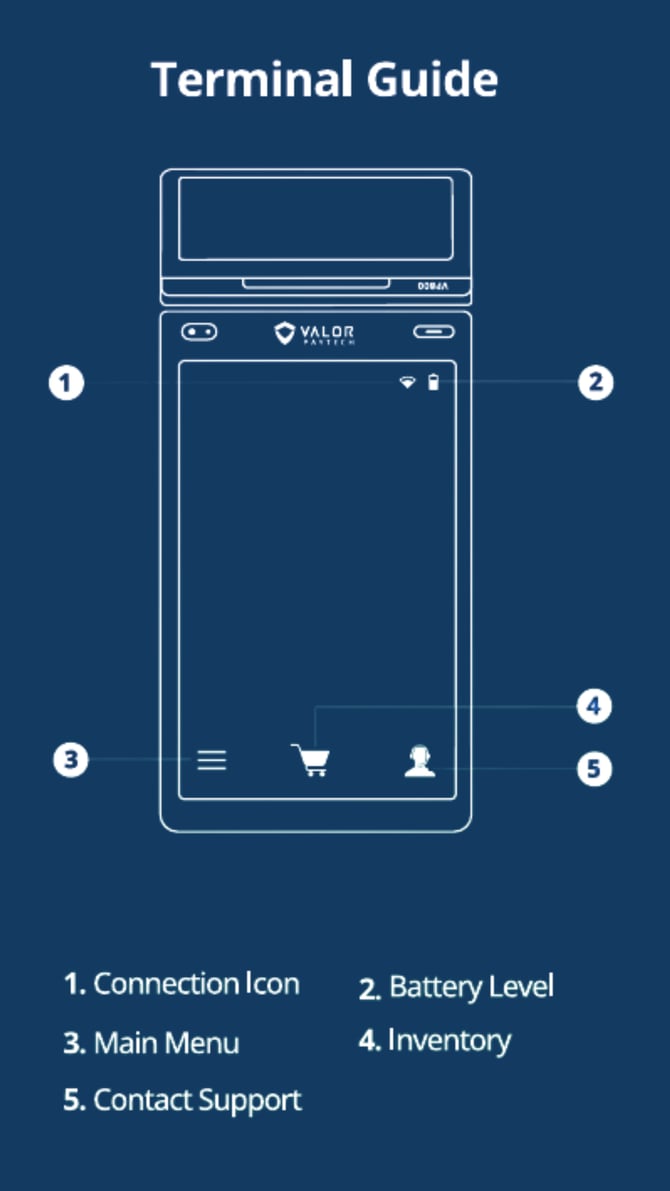 |

|
CARD SALE
- Enter Transaction Amount and tap CARD.
- Swipe/Insert/Tap card on Present Card screen.
For Manual Key Entry, select Enter Manually. - Sign and Tip if prompted.
- Select receipt delivery method.
CASH SALE
- Enter Transaction Amount and tap Cash.
- Select receipt delivery method.
CARD VOID
- Tap Menu button, followed by Payments.
- Enter Transaction Number from the receipt or last 4 digits of card number, then tap Enter.
- When prompted, enter Password.
- Tap to confirm transaction to be voided.
- Select receipt delivery method.
CARD REFUND
- Tap Menu button, followed by Payments, then Refund.
- Enter Transaction Amount and tap Enter.
- Swipe/Insert/Tap card on Present Card screen.
For Manual Key Entry, select Enter Manually. - Select receipt delivery method.
CARD PREAUTH
- Tap Menu button, followed by Payments, then PreAuth.
- Enter Transaction Amount and tap Enter.
- Swipe/Insert/Tap card on Present Card screen.
For Manual Key Entry, select Enter Manually. - Select receipt delivery method.
CAPTURE PREAUTH
- Tap Menu button, followed by Payments, then Ticket.
- Enter Transaction Amount and tap Enter, then enter Password.
- Enter Transaction Number from receipt or last 4 digits of card number and tap Enter.
- Sign and Tip if prompted.
- Select receipt delivery method.
MAIN MENU OPTIONS
- Transactions – Overview of transactions posted on selected date.
- Settlement – Perform a batch settlement.
- Pre Sale – Create a pre-sale ticket.
- Updates – Perform a parameter or application download on terminal.
- Payment – Perform multiple payment types.
- Reports – View different report types.
- Tip Adjust – Perform tip adjust on open batch transactions.
- Reprint Receipt – Reprint last transaction's receipt.
- Reprint – Reprint previous transaction receipts.
- Settings – Configure device settings including Wi-Fi, SIM, passwords, etc.
CONNECT TO WIFI
- From the Home Screen, tap the Main Menu icon.
- Tap Settings, then WiFi Config.
- Tap SSID.
- Enter WiFi Password (Password is case sensitive).
- Tap Connect.
Downloadable Resources
Note: Looking to better understand the Valor VP800 and its capabilities? All Quick Reference Guide resources mentioned here are available for download, perfect for sharing with your team or reviewing offline to see how the VP800 can streamline your payment processing experience.