.png?width=300&height=300&name=Untitled%20design%20(6).png)
Quick checks (do these first)
-
Confirm the device is online — verify the terminal shows network connectivity (Wi-Fi/Ethernet/cellular).
-
Ask the merchant for the exact error text and the time the settlement was attempted.
- If auto-batch is enabled, note that a manual settlement will override the auto-batch for that period.
| To perform a batch from a device, you must select the star on bottom left of the touch screen on your device to show the favorites menu. | 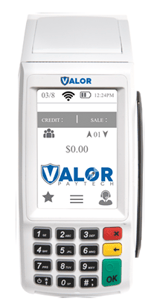 |
| Once you are in the favorite's menu, select number #2 for the settlement option. | 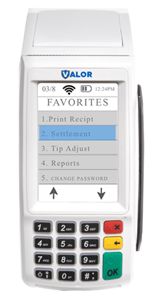 |
| From here enter your password. The password is the last four digits of your EPI number, which is conveniently show on the screen. You can always change your EPI in your settings directly on the device. | 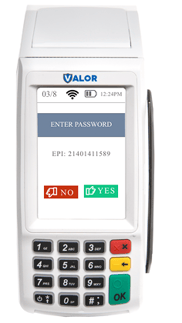 |
| Select the green Ok button on the screen or the keypad to settle your batch. If you are to auto batch, you can manually override your auto batch setting. | 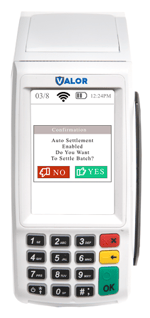 |