.png?width=300&height=300&name=Untitled%20design%20(6).png)
Purpose
Use this procedure when a terminal should no longer be managed or receive updates from PAX Store (for example, for deprovisioning, device replacement, or troubleshooting).
Steps
-
Sign in to PAXStore.
-
In the left-hand menu, click Terminal Management.
-
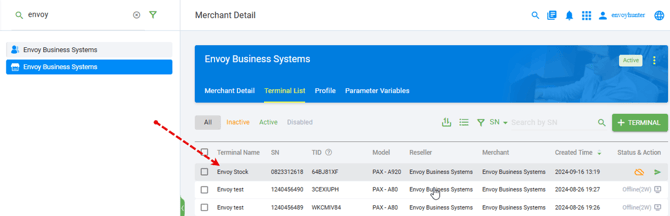
Search for the merchant and open the merchant record.
-
From the merchant’s device list, click the device you want to disable.

-
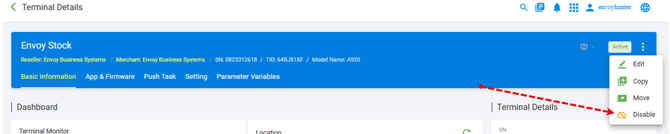
Click the three dots (⋯) on the right-hand side of the device row to open the actions menu.
-
Choose Disable.
-
If prompted, confirm that you want to disable the device.
To re-enable a device
-
Return to Terminal Management and locate the merchant and device.
-
Click the device, open the three dots (⋯) actions menu, and choose Enable (or Re-enable), then confirm.