.png?width=300&height=300&name=Untitled%20design%20(6).png)
PAX S80 Retail/Restaurant QRG (Envoy)
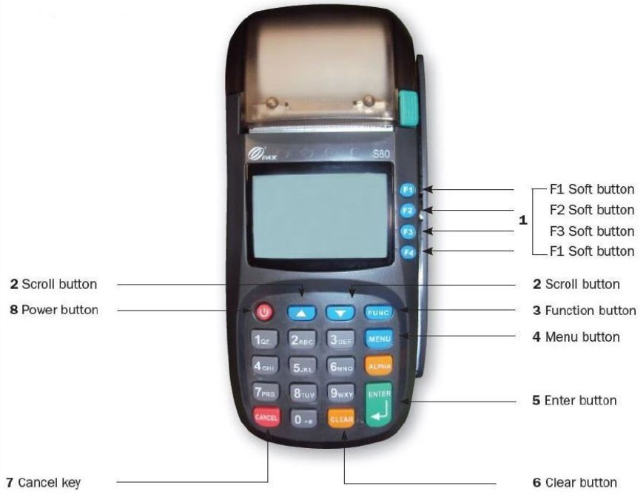
CREDIT CARD SALE
- Enter the sale amount and press ENTER.
- Enter the tip amount (if applicable) and press ENTER. Restaurant only.
- Swipe the card.
- If prompted, enter the server ID and press ENTER. Restaurant only.
- The terminal prints while processing.
- When prompted "Tear Slip → Press Any Key," press ENTER for a customer copy or CANCEL to return home.
NFC SALE
- Enter the sale amount and press ENTER.
- Enter the tip amount (if applicable) and press ENTER. Restaurant only.
- Tap the device just below the display; wait for the beep.
- If prompted, enter the server ID and press ENTER. Restaurant only.
- The terminal prints while processing.
- When prompted "Tear Slip → Press Any Key," press ENTER for a customer copy or CANCEL to return home.
MANUALLY KEYED IN SALE
- Enter the sale amount and press ENTER.
- Enter the tip amount (if applicable) and press ENTER. Restaurant only.
- Type the card number and press ENTER.
- Enter the expiration date (MMYY) and press ENTER.
- When asked if the card is present, select YES or NO.
- If prompted, enter the server ID and press ENTER. Restaurant only.
- Enter the CVV2 and press ENTER (or press ENTER to skip if unavailable).
- If CVV2 was skipped, choose the reason: Want to bypass, Cannot read, or Does not exist.
- Enter the billing ZIP code and press ENTER.
- The terminal prints while processing.
- When prompted "Tear Slip → Press Any Key," press ENTER for a customer copy or CANCEL to return home.
DEBIT SALE
- Press F3 to toggle to DEBIT, enter the amount, then press ENTER.
- Enter the tip amount (if applicable) and press ENTER. Restaurant only.
- Swipe the debit card.
- If prompted, enter the server ID and press ENTER. Restaurant only.
- Enter the 4-digit PIN on the PIN pad and press ENTER.
- The terminal prints while processing.
- When prompted "Tear Slip → Press Any Key," press ENTER for a customer copy or CANCEL to return home.
EBT SALE
- Press F3 twice to toggle to EBT, then press ENTER.
- Select the EBT type: FoodStamp, CashBenefit, or Voucher.
- Enter the amount and press ENTER.
- Swipe or key the card, then press ENTER.
- If prompted, enter the server ID and press ENTER. Restaurant only.
- Enter the 4-digit PIN on the PIN pad and press ENTER.
- The terminal prints while processing.
- When prompted "Tear Slip → Press Any Key," press ENTER for a customer copy or CANCEL to return home.
FORCED SALE
- Press F4 three times to set sale type to FORCED, enter the amount, then press ENTER.
- Enter the tip amount (if applicable) and press ENTER. Restaurant only.
- Swipe or key the card, then press ENTER.
- Enter the 6-digit authorization number and press ENTER.
- If prompted, enter the server ID and press ENTER. Restaurant only.
- The terminal prints while processing.
- When prompted "Tear Slip → Press Any Key," press ENTER for a customer copy or CANCEL to return home.
VOID
- Press the FUNC key.
- At the Function Menu, press 7 for Void.
- If prompted, enter the server ID and press ENTER. Restaurant only.
- Enter the transaction number and press ENTER.
- Verify the transaction details and press ENTER to continue (or CANCEL to abort).
- Confirm the void by pressing ENTER (or CANCEL to abort).
- The terminal prints while processing.
- When prompted "Tear Slip → Press Any Key," press ENTER for a customer copy or CANCEL to return home.
REFUND
- Press the FUNC key.
- At the Function Menu, press 8 for Return.
- Enter the Manager's Password.
- Select payment type: CREDIT, DEBIT, or EBT.
- Enter the amount and press ENTER.
- Swipe or key the card, then press ENTER.
- If prompted, enter the server ID and press ENTER. Restaurant only.
- The terminal prints while processing.
- When prompted "Tear Slip → Press Any Key," press ENTER for a customer copy or CANCEL to return home.
REPRINT
- Press the FUNC key.
- At the Function Menu, press 6 for Reprint.
- Choose Last Customer Receipt or Any Receipt.
- Select the payment type.
- Enter the transaction number and press ENTER.
- Choose copy type: Customer or Merchant.
REPORTS
- Press the FUNC key.
- At the Function Menu, press 1 for Report.
- Enter the Manager's Password.
- The terminal prints the current batch report.
Additional Resources
Note: Looking to better understand the PAX S80 and its capabilities? All Quick Reference Guide resources mentioned here are available for download, perfect for sharing with your team or reviewing offline to see how the PAX S80 can streamline your payment processing experience.