Skip to content
English
  • There are no suggestions because the search field is empty.

PAX A77 Quick Set up Guide

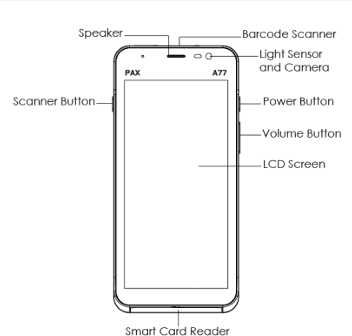
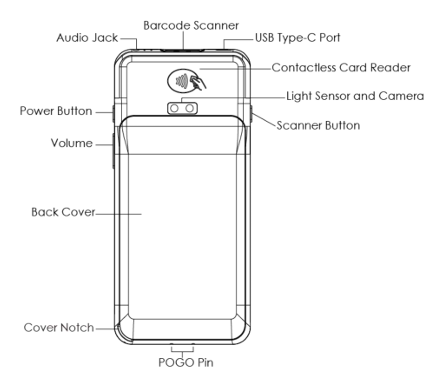
Front  Back
A77 Front View


A77 Back View


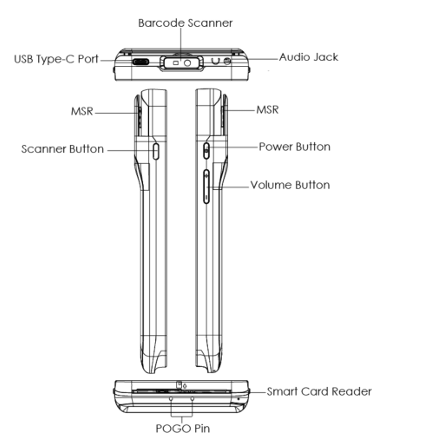
Side View  Port View
A77 Side view


A77 Port


Connect the USB device or PC type C USB port located at the top of the terminal

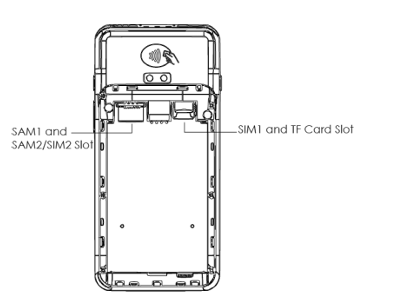
SAM Card & Battery Installation

A77 Sam Slots


SIM/SAM Card Installation

  1. Open the battery cover on the bottom of the terminal.

  2. Remove the battery.

  3. Insert the SIM or SAM card into the appropriate SIM/SAM card slot.

  4. Reinstall the battery and close the battery cover.

MicroSD Card Installation

  1. Open the battery cover on the bottom of the terminal.

  2. Remove the battery.

  3. Insert the MicroSD card into the designated MicroSD card slot.

  4. Reinstall the battery and close the battery cover.

Preparing the Battery for Use

  1. Open the battery cover on the bottom of the terminal.

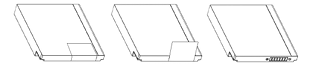
    A77 battery
  2. Remove the battery.

  3. Locate the white tab on the battery and peel back carefully until it is fully removed and the POGO pins are available. 

Additional content can be found here: A77 Quick Set up Guide