Lower Voltage – PAX A Series Printer Troubleshooting
“Lower Voltage” on PAX A Series
Low-voltage warnings on PAX A-Series devices generally indicate insufficient power reaching the terminal, unstable input voltage, or a battery that can no longer sustain proper operation.
If a merchant reports that the printer on their PAX A80 or PAX A920 is not working, the issue is often related to device power levels. Follow the steps below to diagnose and resolve the problem.
If a merchant reports that their A80 or A920 printer is not working, follow these steps to troubleshoot:
- Check PAXstore for Errors:
- Pull up the terminal in PAXstore and navigate to Settings.
- Look for any error messages related to the printer.
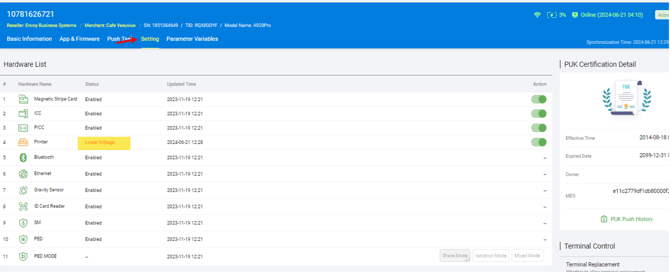
- Identify the "Low Voltage" Error:
- If you see a "Low Voltage" error, this indicates that the device has a low battery.
- The device must have at least 30-40% charge for the printer to function properly.
- Printer operations may fail even if the device appears powered on.
- Advise the Merchant:
- Instruct the merchant to charge the device.
- Once the device is sufficiently charged, the printer should work without any issues.
- If you see a "Low Voltage" error, this indicates that the device has a low battery.
By checking for errors in PAXstore and ensuring the device is charged, you can help resolve printer issues effectively.
Additional Troubleshooting
| Step | Actions | Notes / Why |
|---|---|---|
| Confirm Power Source Stability |
|
Why: Low or inconsistent AC voltage can cause repeated low-voltage messages, especially during boot or printing. |
| Inspect the Charger, Cable & Connectors |
|
Tip: A failing charger may still power on the device but won't sustain charge under load. |
| Battery-Specific Checks (A920 / A77 / A60) |
|
Indicators of a failing battery:
|
| Troubleshoot With & Without Accessories |
If using additional hardware, disconnect and test the terminal alone:
|
A faulty dock or accessory can introduce unstable voltage. Testing the terminal alone isolates the issue. |
| Review Temperature & Environmental Factors |
PAX terminals may display low-voltage warnings if exposed to:
|
Move the device to a stable room-temperature location and allow it to normalize before powering on. |
| Run a Device Power Test (If Supported) |
Some A-Series terminals allow access to internal diagnostics:
|
Internal diagnostics help confirm whether issues are related to battery health or charging circuitry. |
| Check for Firmware or OS Issues |
|
Corrupted firmware or outdated system files can cause voltage reporting errors or unstable behavior. |