.png?width=300&height=300&name=Untitled%20design%20(6).png)
-
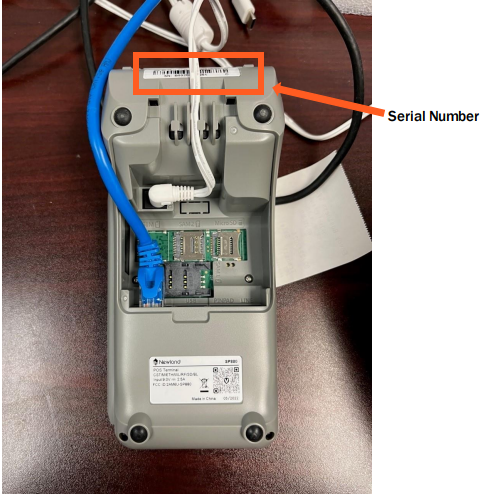
Turn the device around to view the back side of the terminal.
-
Look near the Top section of the terminal’s backside.
-
You will see a wiring guide – showing cable or port layout.
-
Directly above this wiring guide, you’ll find a white sticker that includes:
-
The serial number (SN or S/N) – typically a combination of letters and numbers.
-
- Bottom of the device back side will display terminal Manufactuing info
-
Other information such as the model number, FCC ID, or manufacturing date.
-
Locating Serial Number inside of Device Management
If the terminal's serial number sticker is missing or unreadable, you can still find the serial number in the Device Management by following these steps:
Steps:
-
Navigate to Device Management
-
Open the Sidebar Menu and select Device Management.
-
-
Locate the Device
-
Find the relevant Device EPI (Endpoint Identifier) in the list.
-
-
Open Serial Number History
-
Click the Vertical Ellipsis (⋮) next to the device entry.
-
Select View Serial # History from the dropdown options.
-