.png?width=300&height=300&name=Untitled%20design%20(6).png)
A tokenized card is a security-enhanced digital version of a payment card (credit, debit, or prepaid) where the actual card number (PAN) is replaced with a unique, random identifier called a token.
Here’s a breakdown of what that means and why it’s used:
How It Works
-
When a customer’s card is added to a payment system (like a Virtual Terminal, payment gateway, or mobile wallet), the real card number is not stored or transmitted.
-
Instead, the payment processor generates a token; a randomly created string of numbers and letters that represents the actual card.
-
This token can be used for future transactions (e.g., recurring payments, refunds) without exposing the card’s sensitive details.
Follow these instructions to delete tokenized cards from the virtual terminal:
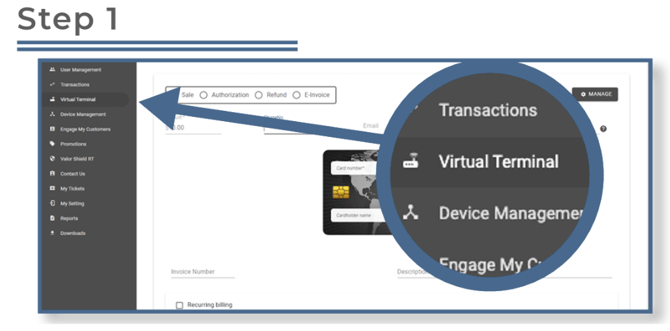
From your portal login, select Virtual Terminal from the sidebar.
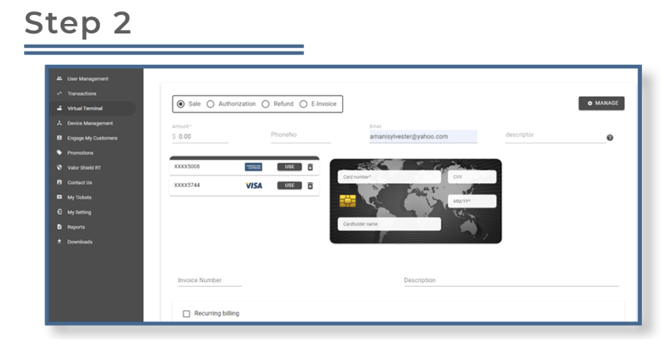
Enter the email address or phone number linked to the card you want to remove. The associated cards will appear on the left side of the screen.
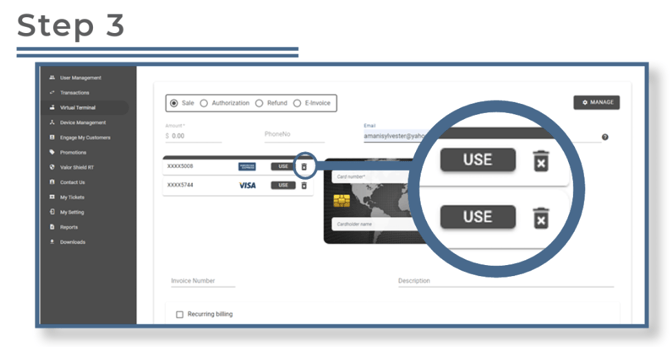
Click the trash can icon next to the card you wish to delete.
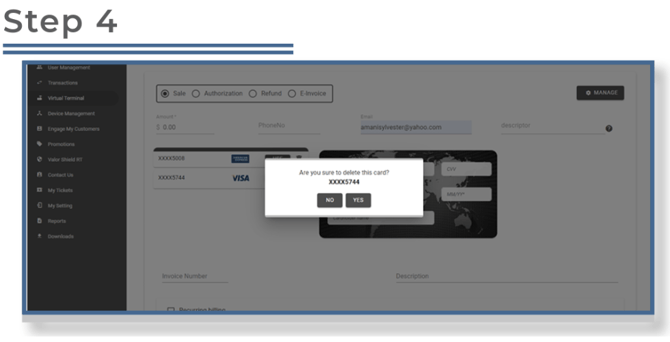
On the confirmation screen, select Yes to permanently delete the card.